Many people may not know what TCP/IP is nor what its effect is on the Internet. The fact is, without TCP/IP there would be no Internet. And it is because of the American military that the Internet exists.During the days of the cold war, the defense department was interested in developing a means of electronic communication which could survive an attack by being able to re-route itself around any failed section of the network.They began a research project designed to connect many different networks, and many different types of hardware from various vendors. Thus was the birth of the Internet (sorta). In reality, they were forced to connect different types of hardware from various vendors because the different branches of the military used different hardware. Some used IBM, while others used Unisys or DEC.
TCP (Transmission Control Protocol) and IP (Internet Protocol) were the protocols they developed. The first Internet was a success because it delivered a few basic services that everyone needed: file transfer, electronic mail, and remote login to name a few. A user could also use the “internet” across a very large number of client and server systems. As with other communications protocols, TCP/IP is composed of layers. Each layer has it’s own responsibility:
IP is responsible for moving data from computer to computer. IP forwards each packet based on a four-byte destination address (the IP number). IP uses gateways to help move data from point “a” to point “b”. Early gateways were responsible for finding routes for IP to follow.
TCP is responsible for ensuring correct delivery of data from computer to computer. Because data can be lost in the network, TCP adds support to detect errors or lost data and to trigger retransmission until the data is correctly and completely received.
How TCP/IP works
Computers are first connected to their Local Area Network (LAN). TCP/IP shares the LAN with other systems such as file servers, web servers and so on. The hardware connects via a network connection that has it’s own hard coded unique address – called a MAC (Media Access Control) address. The client is either assigned an address, or requests one from a server. Once the client has an address they can communicate, via IP, to the other clients on the network. As mentioned above, IP is used to send the data, while TCP verifies that it is sent correctly.
When a client wishes to connect to another computer outside the LAN, they generally go through a computer called a Gateway (mentioned above). The gateway’s job is to find and store routes to destinations. It does this through a series of broadcast messages sent to other gateways and servers nearest to it. They in turn could broadcast for a route. This procedure continues until a computer somewhere says “Oh yeah, I know how to get there.” This information is then relayed to the first gateway that now has a route the client can use.
How does the system know the data is correct?
As mentioned above, IP is responsible for getting the data there. TCP then takes over to verify it.
Encoded in the data packets is other data that is used to verify the packet. This data (a checksum, or mathematical representation of the packet) is confirmed by TCP and a confirmation is sent back to the sender.
This process of sending, receiving and acknowledging happens for each individual packet sent over the Internet.
When the data is verified, it is reassembled on the receiving computer. If a package is not verified, the sending computer will re-send it and wait for confirmation. This way both computers – both sending and receiving – know which data is correct and which isn’t.
One nice thing about this protocol is that it doesn’t need to stick to just one route. Generally, when you are sending or receiving data it is taking multiple routes to get to its destination. This ensures data accuracy.
Just the facts:
TCP/IP addresses are based on 4 octets of 8 bits each. Each octet represents a number between 0 and 255. So an IP address looks like: 111.222.333.444.
There are 3 classes of IP addresses:
Ranges starting with “1” and ending with “126” (i.e.. 1.1.1.1 to 126.255.255.254) are Class A
Ranges starting with “128” and ending with 191 (i.e.. 128.1.1.1 to 191.255.255.254) are Class B
Ranges starting with 192 and ending with 254 (i.e.. 192.1.1.1 to 254.255.255.254) are Class C ( You will notice that there are no IP addresses starting with “127”. These are reserved addresses.)
Calculating an IP address
One of the things that always confused me was how to convert IP address to their Binary form. It is quite simple really. IP addresses use the Binary numbers (“1”s and “0”s) and are read from right to left.
Each position in the binary address corresponds to a number, from 1 to 128 and look like this:
128 64 32 16 8 4 2 1
To calculate an address, simply add the numbers where a “1” appears.
For example, the following:
00001010 works out to 10. Like this:
0 0 0 0 1 0 1 0 128 64 32 16 8 4 2 1
You can see that the “1”s line up with the 2 and 8 – when you add 2 plus 8 the answer is 10.
Since an IP address contains 4 of these octets, it can be displayed in binary like:
00001010.00001010.00001010.00001010
Therefore, IP Address 10.129.254.1 would be converted to:
While it’s not important for the average person to know how to figure this stuff out, it is important for someone setting up a small network. That is because TCP/IP also uses what are called subnet masks to determine which addresses are valid.
In 2009,these 10 technologies can provide companies with a competitive advantage in what is expected to be a very tough year on the bottom lines of IT budgets, IT management and IT vendors. However, even in an economic downturn those companies that invest, develop and capitalize on technologies that save money while improving the efficiency and effectiveness of business have an opportunity to grab significant market and mind share with new and existing customers.
1. Software as a Service (SaaS)
A few years ago, the idea of running software remotely seemed preposterous. Bandwidth limitations, performance obstacles and IT administration issues made hosted software impractical. But times change. Today, software as a service (SaaS) is growing at an annual rate exceeding 40 percent. In fact, it is expected to command a 23 percent share of the $120 billion U.S. software market by 2010, according to RBC Capital Markets.
2. Virtualization
This technology has already made its mark on the data center. According to various industry estimates, between 50 percent and 60 percent of all servers are now virtualized. The goal, of course, is to reduce server sprawl—and the inefficiencies and higher costs associated with it.
Virtualization is continuing to grow. “It is now moving into the realm of SMBs [small and medium businesses], and is also extending into storage and onto the desktop”
3. Enterprise Mobility
It’s easy to forget that only a few years ago the typical office worker was bolted to a desk and connected to data by wires, cords and cables. Over the last few years, wireless technology—including 3G cellular data networks and widespread Wi-Fi—has opened the door to an anytime, anywhere business model.
The major drawback has been the necessity to grab data as needed and ensure that all data is synchronized on a real-time—or, at least, a near real-time—basis. “Ensuring that data is available when and where it’s needed has been an ongoing challenge”.
In fact, the concept will likely gain momentum in 2009, as cloud computing becomes more widely accepted. More bandwidth, better software and concerns for security are also leading more firms to adopt thin-client computing. These systems access data as needed and store it on a remote server.
“Technology has changed the entire business model and made telework and mobility a strategic advantage”.
4. Energy-Efficient Data Centers
It seems like only months ago that “green” represented little more than a nice idea and a noble cause. That’s until energy prices shot skyward and cost-cutting took on a sense of urgency due to deteriorating economic conditions. Now, “Green is on every company’s radar,”
Organizations understand how important it is from a basic business perspective.”
Chip and PC manufacturers are moving toward more energy-efficient components—including improved memory and resource management—but the big action in 2009 will be in the areas of virtualization and storage. “Virtualization eliminates energy costs, maintenance outlays, cooling expenses and data center costs by as much as 90 percent”.
“The payback is enormous, and it’s something organizations can no longer afford to ignore.”
5. Security, Risk and Compliance
In the constantly evolving areas of security, risk and compliance, there are no simple solutions. With each passing day, threats and challenges become more complex, and compliance becomes more of a concern.
Smart IT executives are beginning to recognize that having a tangle of systems and processes spells trouble. “Regulations are pushing organizations to change and be more in control of their systems and business processes”.
IT industry believe that automation is essential—particularly on the risk and security compliance side of things. This includes everything from intrusion detection to authentication; from patch management to analytics used for security. A growing number of organizations are turning to self-encrypting hard drives, two-factor authentication (to replace simple passwords) and security suites that provide central control panels. This trend will continue into 2009, as continuous-monitoring tools become standard in the enterprise.
6. Social Networking
LinkedIn, Facebook, MySpace and a spate of similar sites have transformed social networking from a buzzword into a business buzz saw. Companies as diverse as American Express, Del Monte and Cisco Systems have unleashed powerful social networking tools, including wikis, blogs, discussion groups, collaborative filtering, and even applets and games. The concept is allowing these companies to tap into the power of human connections and knowledge in ways that were unimaginable only a few years ago.
In reality, social networking is nothing new. E-mail, chat and instant messaging are more basic forms of the concept. But, as Web 2.0 tools have emerged and other software has matured, “Social networking has become a way for organizations to leverage enterprise knowledge, customer-based business intelligence and more”.
Organizations are increasingly looking to next-generation social networking tools to conduct sophisticated business intelligence and analytics. In many cases, they are mining data and looking for trends and patterns, such as which salesperson has the relationships to pull off a deal or which customers seem to have the biggest influence with others online. Some are building LinkedIn- and Facebook-type applications to keep people in touch and ratchet up knowledge management initiatives.
“The goal is to do things faster, better and more profit-ably”. “That’s where the social networking light is shining. The tools are improving to the point where it’s possible to put information and resources to work in new ways and build greater value.”
7. Web 2.0
The evolution of the Web has been nothing short of amazing. Though each generation of tools creates new opportunities, the current and emerging array of Web 2.0 applications is completely revolutionizing the enterprise.
The growing use of interactive maps, blogs, wikis, mashups, social bookmarking, enhanced search engines, RSS feeds and social networking is only the start. Web 2.0 tools are also making it easier to manage data, tasks and business processes.
Some organizations are now exploring Twitter- or Facebook-like applications that allow individuals to push information out to followers and create a simpler, organic communications structure. Others are using Web 2.0 tools to handle everything from institutional asset management to business intelligence and analytics.
Web 2.0 is further enabling mobility and more seamless access to pertinent information.
8. Document Management and E-Discovery
Managing business documents has traditionally been a sore point for many organizations. Although file cabinets have been replaced by databases, being able to find relevant documents when and where they’re needed remains a huge challenge for business.
“It’s not as simple as switching on a document management system and having everything at your fingertips.” Indeed, organizations are recognizing that document management and e-discovery ripple into areas as diverse as IT storage, mobile devices and business processes.Although vendors are adding more sophisticated capabilities to their applications—including the ability to track text messages, IMs and other types of unstructured data—the main challenge is figuring out how to develop systems that retain, manage, and retrieve documents and data quickly and seamlessly.
At the same time, organizations are learning that electronic discovery (e-discovery) is a process, not a technology. “It [e-discovery] increasingly includes a whole range of tools and technologies that create a complete solution".
Nevertheless, for both document management and e-discovery, new vendors are pouring into the market, with industry behemoths such as Oracle and Microsoft making their own forays. There’s some good news for enterprises looking to put solutions in place: “It is likely to be a buyer’s market in 2009". “Vendors entering the market are introducing products and solutions at a much lower price point than they were in the past.”
9. Project Management and Project Portfolio Management
In today’s time-sensitive and budget-conscious world, getting projects finished on time is paramount. Not surprisingly, more and more organizations are turning to structured systems and software to track all the details. Consequently, project management (PM) and project portfolio management (PPM) have moved into the spotlight.
Many businesses are turning to more formal tools.They are hoping to work in a more iterative yet structured way.
Meanwhile, PPM is evolving and bringing greater order to business-level decision making. Applications such as Daptiv PPM and Primavera (recently purchased by Oracle) are providing tools to mesh diverse workgroups, such as finance, marketing, human resources and IT—all while viewing groups of initiatives, conducting detailed analyses on them, and understanding the underlying relationships across organizational roles and teams.
As organizations embrace PPM, they are becoming far better equipped to react to rapidly changing business and industry conditions. “At this point, it is important for IT to develop PM and PPM expertise,”.“These started as business initiatives, but they have become a crucial part of IT.”
10. Web and Video Collaboration
Not so long ago, the idea of a workgroup collaborating over the Web was unthinkable. Over the last few years, however, applications like WebEx and NetMeeting have revolutionized the way people interact—at least within some companies and in certain situations.
Today, collaboration tools are poised to go mainstream and further change the way business is conducted. According to the Boston-based research firm Aberdeen Group, 63 percent of companies say they will be using videoconferencing and so-called telepresence systems (essentially, a form of videoconferencing with high-quality images and audio) by the end of 2010. Only 18 percent say they have no plans to adopt these systems.
Driving this phenomenon are bigger pipes and converged data and voice networks within enterprises. “Organizations are beginning to realize that collaborative applications can serve as a significant competitive advantage.“The technology has the ability to shift the balance of power. Many organizations are turning to these applications for their mission-critical activities.”
Meanwhile, the mobile-video market is also gaining momentum. In-Stat, a market research firm in Scottsdale, Ariz., predicts that 160 million devices for viewing mobile video (not including mobile phones) will be sold over the next five years.
“We are entering a new era of video and Web collaboration”
A Gadget is a small technological object (such as a device or an appliance) that has a particular function, but is often thought of as a novelty. Gadgets are invariably considered to be more unusually or cleverly designed than normal technology at the time of their invention. Gadgets are sometimes also referred to as Gizmo...
You know how you can tell that this is a "luxury" phone? It looks like it was shaped by an overly taut sphincter. The Vertu Boucheron 150 is made from "solid gold" and is meant to celebrate the 150th anniversary of the Boucheron jewelry house in Paris. According to the designer, it took 1,000 hours to cut into shape, 700 hours to hand polish, and more than 500 hours to build. Funny, it only took us a split-second to wretch. Do the Japanese really prefer these Vertu designs from Nokia over the E71? No price or any real detail announced, just a picture of the enormous packing box after the break.
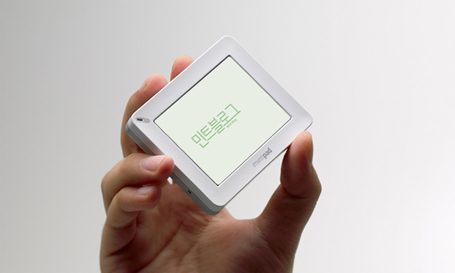
Mintpad
Popgadget: If you are a digger for gizmos with small form factors, this first brainchild from the Korean company MintPass will most likely leave you lusting shamelessly for one - the WiFi-enabled multimedia device called the MintPad.
The MintPad is probably the coolest mini-gadget that we’ve seen in quite a while. Though it looks absolutely cute, the device has sophisticated functions. Cut it up and you find that it is somewhat like a mini-tablet PC - a 3-inch TFT screen, 1.3MP camera, and 4GB memory for playing music, videos and storing photos (with support for upto 8GB microSD). The interesting thing however is, you can create notes similar to Post-It notes and send it out to your friends via Wi-Fi. And if you can manage to - have fun blogging, browsing, or chatting with your friends.
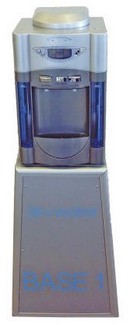
Self Filling Water Cooler:
The Red Ferret: This Klimatec Base 1 AirWater Machine is a self-filling water cooler which extracts water from the air, purifies it and serves it up in nice refreshing dollops of goodness. Or something. We’re talking 20 litres every 24 hours, it can be solar powered and you can attach an optional fridge unit for super coldness. Sounds like a pretty neat plan, eh?
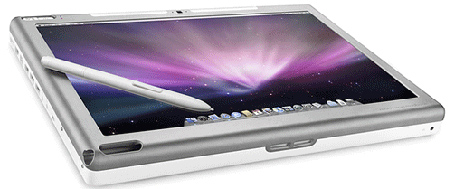
Axitron is preparing to release it’s Axitron ModBook, a revolutionary slate-style tablet Mac that enables users to draw and write directly on the screen. Until now, with the exception of using a Wacom Tablet, Apple has not introduced a tablet style notebook for their OS X platform.
The Axiotron Modbook boasts a 2.1GHz+ of processing speed, 1GB+ of memory, and the full-range of Apple MacBook connectivity via Ethernet, USB, FireWire®, Bluetooth and AirPort® while running the OS X v10.5 Leopard platform. The tablet is also equipped with a built-in iSight camera, optical drive and internal GPS.
Axiotron’s innovative design and manufacturing process integrates an Apple® MacBook® computer, state-of-the-art Wacom® pen-enabled digitizer technology and Axiotron’s own proprietary hardware and software components into a complete tablet solution, the Axiotron Modbook.
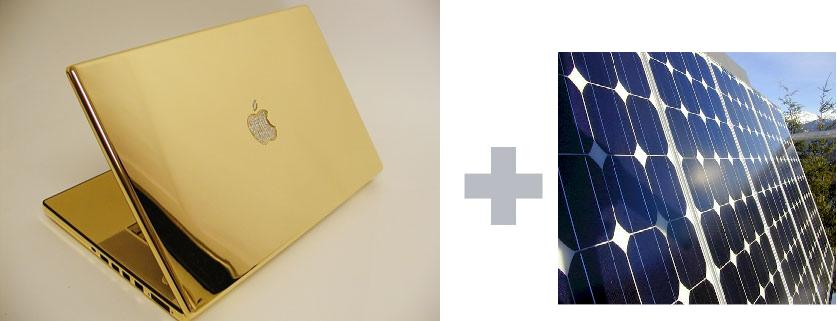
Inhabitat: Well, we just spotted some breaking greener gadget news that are sure to get Apple fans excited! Drumroll please..
Apple just filed a patent to infuse their hand-helds and computers with a thin film of solar cells, paving the way for a new generation of gadgets with battery life boosted by the sun. The patent approaches the prospect from every angle, with schematics to stack photovoltaic cells beneath the entire surface of their portables - including the screen!
The patent states a variety of possible applications: “Solar cells are typically stacked with other layers made of transparent or semi-transparent materials… Some of these layers may be used for display or input purposes, and some layers may be coated with various materials or they may be etched with product logos or other patterns.” It goes on to explain that devices could display the performance of the solar cells on their screens next to the battery bar, or even on top of the cells themselves.
It will be interesting to see if the use of photo-voltaic panels in portable electronics will contradict the current consumer trend towards smaller and smaller gadgets, since a large, flat surface is required for solar to have any degree of efficiency.
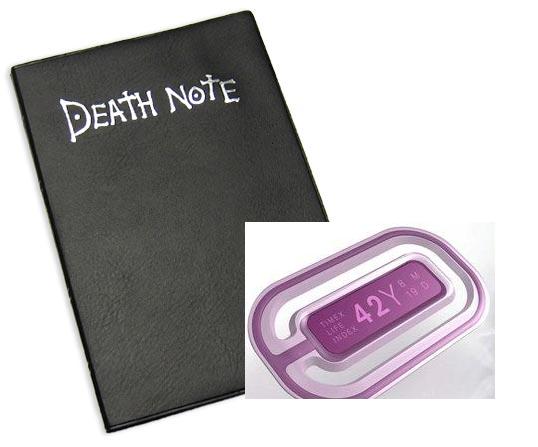
Have you heard to the one of the most popular Japanese comic Death Note? A powerful Notebook with the ability to cause the death of a person in an accurate timing written beforehand. Now, we have a Life Index Watch, a concept developed for a Timex competition that keeps track of your remaining days based on personal biometrics. Sounds cool is'nt it!
Productdose: Would knowing how much time you have left make you live life to the fullest or would it paralyze you with anxiety? The technology is coming when your biometrics can give you an approximation of your remaining days. Worn like a patch on the skin, the Timex 2154 watch won't tell you if a truck is going to hit you but based on your fitness, stress, nutrition, sleep, and environment it will let you know when your most important date of all is set to arrive.
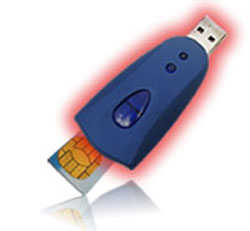
Gadgets Review: Are you paranoid about the fact that your girlfriend or boyfriend is cheating you? Do you want to know, what numbers she just dialed and what SMS had sent? You can hire a private detective for all this tasks, but his services may cost you more than expected. Listening devices are expensive to buy and need a special equipment to listen… There is a solution, which is not based on eavesdropping, and uses a very interesting method of spying: it scans the main chip of every GSM cell phone - SIM card!
This Cell Phone Spy Data Extracktor look just like an ordinary USB Flash drive. However, do not judge it by its size - it can be a powerful tool if used correctly. Just insert the SIM card in the device, plug it in the PC and you will be able to see all the numbers that was dialed through that SIM, even deleted ones! It can also restore deleted SMS messages and call logs, so nothing will be hidden from you. The manufacturer claims, this is the first SIM reader in the world that can actually see deleted messages. More than that, this gadget can be used in peaceful ways, to make backup copies of a phonebook or messages. Or you can make a full SIM card backup, buy a clean SIM card if needed and load your stored backup data on it.
Coolbuzz: If you own a cute pet and fears about regularity of his routine meals in your absence, then you need something like ‘Intelligent Programmable Pet Dish’ on which you can ensure timely meals by programming up to four time’s meal on a digital programmable timer and self-opening food tray that will automatically serve the pet. On scheduled time it will use your recorded voice for alert.
With four different trays, it can hold four separate dry or moist foods, which automatically opens to expose the material. Water compartment will take care of thirst and moistening of food. It has a digital display for easy programming. It can record a 20 minutes voice file and originate in durable ABS plastic with removable dishwasher safe lids.
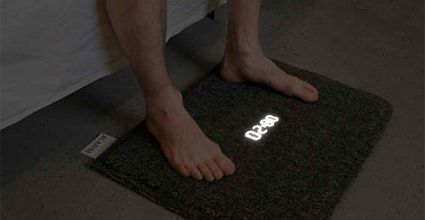
CoolBuzz: It’s a wake up call for the lazy people around the world! Sofie Collin and Gustav Lanber thought about the welfare of the late-risers and developed this Carpet Alarm Clock.
It’s not a simple alarm clock, which will turn off by pressing one button with hand, you will have to get-up from your bed and step on it in order to turn it off. However, this smart carpet with in-built clock won’t let you prolong your sleep minute by minute. Don’t you think this is a must-have product for your obese partner and kids?
Anyways, I leave it on you to decide what is best for you; I think I’ll need two or three clocks to wake me up.
Pedal the plug out with Eject Powerstrip. It is a forward-looking redesign of a powerstrip that would allow people to easily, safely and enjoyably unplug their devices.
People don't unplug their devices because:
1) they are lazy
2) they are too old or disabled to bend down
3) their powerstrips are located in areas they can't access without accidents (under tables, drawers)
4) when dealing with cheap powerstrips, unplugging a device can be dangerous.
purCushion integrates a microphone that connects to mobiles over Bluetooth, meaning you only have to rest your head on the pillow before you can chat.
The funny shaped pillow is 660mm long and its cotton velvet surface has several buttons for pairing your phone, answering calls and the like. The built-in battery provides up to eight hours of continuous chatter and it’ll snooze in standby for up to 300 hours.
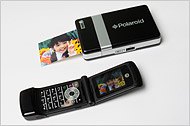
NYT: MILLIONS of families once snapped Polaroid photographs and enjoyed passing around the newly minted prints on the spot, instead of waiting a week for them to be developed. Now, Polaroid wants to conjure up those golden analog days of vast sales and instant gratification — this time with images captured by digital cameras and camera phones.
This fall, the company expects to market a hand-size printer that produces color snapshots in about 30 seconds.
Beam a photograph from a cellphone to the printer and, with a gentle purr, out comes the full-color print — completely formed and dry to the touch.
The printer, which connects wirelessly by Bluetooth to phones and by cable to cameras, will cost about $150. The images are 2 inches by 3 inches, the size of a credit card. The new printers are so lightweight that a Polaroid executive demonstrating them recently had three tucked unnoticeably into various pockets of his trim jacket, whipping them out as if he were Harpo Marx.
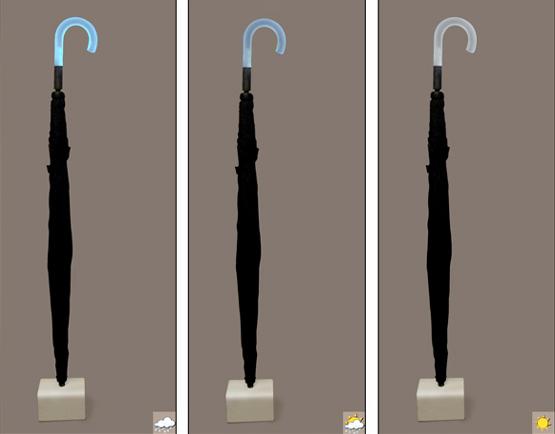
Crave: Sure, you can have the weirdest umbrella inventions, but none of these actually tell you when the rain is coming. Which is the whole point of carrying a brolly, right?
Apparently, the Forecast prototype goes all the way back to 2005 and the idea behind it is really simple. The umbrella comes with a docking station which is able to pull weather data off the Internet via Wi-Fi. Electric leads will then light up an LED on the handle with varying intensity to tell you the likelihood of rain. So you know whether to bring the brolly with you on your way out.
Sounds brilliant, as long as it doesn't get us fried in a rain puddle, or make us look like a goldfish-bowl Martian.
The overall state of IT remains very strong,....that's very much TRUE...
IT budgets and headcount are holding steady and that many organizations are using IT to drive efficiencies, streamline operations, and cut costs, rather than just slashing the IT budget to save money during a downturn.
Let us prove the things using some facts & figures...The following explanations are discussed using charts...Have a look at them carefully...
Chart 1 below shows that IT budgets (as a percentage of revenue) are increasing. That means that while revenue may be decreasing in some cases, if companies are cutting costs to compensate then not as many of them are making cuts in IT. It can also mean that those companies who are investing more in IT are also benefiting from greater revenue
Chart 1.
As seen in Chart 2, 44% of respondents were planning to increase their IT budgets in 2009 (although the situation may have changed since the economic tumult in September/October).
Chart 2.
There was a slight drop in the number of companies that plan to increase their 2009 IT budget, as you can see in Chart 3. But with the challenges facing the economy, IT budgets remaining flat would be a big victory. So if you look at charts one, two, and three, there’s only one conclusion: “Companies are investing more in IT. It’s as simple as that.”
Chart 3.
Of course, much of the concern around budget cuts is actually a fear of layoffs. Chart 4 shows that 43% of companies surveyed were projecting increased headcount for 2009 and 42% were planning to maintain the same headcount. Chart 5 shows that the 43% projection for 2009 was actually an increase over 2008 and compares favorably to recent years. Again, this was taken in June, so the number is likely to have dropped, but fact that the number was strong as it was in June (when there was still a lot of economic uncertainty) means that it’s unlikely for there to be a precipitous drop in the IT labor market.
Chart 4.
Conclusion:
[Companies] are not cutting IT, that’s the important message… Companies are looking at IT as a lever to cut costs in other parts of the business… Here is IT’s chance to shine. Here’s their chance to make lemonade out of lemons.”
This topic discusses the place and scope of Information Technology (I.T) in the present day Masters in Business Administration (M.B.A) education. It examines the relevance, the depth and breadth of IT subjects in the M.B.A curriculum, to e-enable the new generation of managers.
1.Place and scope:
The scope of IT in Management Education encompasses selection of subjects, depth of coverage, and how to impart such education to the MBA students. It also covers the IT infrastructure needed in B-Schools. IT enabled ambience conducive to producing global managers for the networked global enterprises as planners, managers and entrepreneurs also forms part of the scope of this endeavor.
Let us first look at the different specializations like Marketing, Human Resources (HR), Manufacturing Management, Finance and systems in the present day MBA curriculum. They emerged, as a consequence of the changes in the scale of business and economics of volumes. The need for a class of executives who have to motivate, acquire suitable skills and have a sound knowledge of the working of an industrial enterprise was the main driver. Thus manufacturing oriented knowledge and soft skills of business management became integrated into MBA education.
The models of Business Education based on Industrial Era are now being modified , to support the business needs of this 21st century taking advantage of new technologies. Thus we see today, the following paradigm shift taking place in various facets of MBA education.
PARADIGM SHIFT IN MBA EDUCATION
Earlier (Pre 2000)
Now (Post 2000)
Production and Operations Management
ERP, CRM, SCM and IT enabled manufacturing.
Marketing Management
E-business, E-com, planning web enabled marketing, global / international business, B2B and B2C market places and Cyber exchanges etc;
Human Resources Management
E-HRM, outsourced web based HR management, Distributed HRM etc;
Finance Management
Globalized economy, E-enabled financial data bases, IT in markets management etc;
Systems Management
ICE or IT Technology components, Networking, Sun and Microsoft and other Technologies, IT management, Knowledge management, Business Intelligence etc.
What is the objective of introducing IT subjects in Management Education? ???Is it to enable liberal arts graduates to become knowledgeable and apply IT in business problem solving Or is it to encourage technical & science graduates to imbibe and apply IT to managerial problem solving. I think that it is both.
Acquisition of certain level of IT skills is a prerequisite to the understanding of applying IT to management problems. If you look at successful top executives of IT empowered businesses, this fact becomes very clear.
2.Coverage of IT in MBA curriculum:
The present day MBAs, when they enter their careers, can be assumed to start at one of the categories listed below . Some may have to play a role that combines different categories. Their exposure to IT and related skills while doing MBA needs to be tailored to suit the typical demands of these roles. It is an attempt to classify before attempting the identification of subjects for various courses.
Typical roles of MBAs and IT strengths required
Category
IT strengths required
Line executives
Use of IT tools, PCs/laptops, application software and packages. Planning/sale of IT products.
Staff executives
In depth understanding and application of IT tools & technologies. Analysis using software tools.
Business Analysts
Use and application of IT to customer’s problems. Configuration and customization of software. Planning and managing IT solutions and projects. Planning Guiding and Development of software solutions.
IT marketing, E-HR, Systems Planning, infrastructure service providers and Entrepreneurs.
Tools and Technologies. Planning and managing IT projects. Development of solutions.
Being an MBA is good...Being a Technical engineer is also good...Being a Techno_MBA is The Best.What a Techno_MBA should possess???
THE M.B.A STUDENT
Domain Knowledge, I.T, E.R.P, Business Applications , E-commerce
Application Engg
Knowledge Base
Internet & Web Technologies
Object Oriented Systems Analysis and Design
Relational Data Base Management Systems
J2EE, Dot Net
Networking
Advanced Topics in I.T.
S/W Engineering. & S/W Project Management
Data Mining
Business Intelligence
Human Computer Interaction
EnterpriseApplication Integration
Industry Verticals
IT Enterprise Management
Artificial Intelligence
4.The end product:
With IT integrated MBA education as envisaged above; the management graduates who enter the work arena in the 21st century will be empowered to play meaningful and successful role in the new globalized economy.
Whether MBAs should learn coding, develop and modify programs and applications ???
My answer has always been an unambiguous ‘Yes’. In a way this is a specific example of the philosophical discussion of the point. ‘Whether a manager should know what he has to manage or not’. Management graduates should be able to hold the IT bull by the horns and lead organizations to ride the bull-runs. This strength of leadership to lead IT enabled and networked organizations and their IT resources can be achieved, among others, by true understanding of the present day complex business software applications. To that extent mere mouthing of IT jargon (of which there is no dearth) will not lead one any where. Businesses are increasingly becoming knowledge based and technology enabled. To succeed in such exacting environs, understanding using and managing of IT becomes highly important. It is the sacred duty of educationists, academicians and teachers, to integrate IT in management education meaningfully.